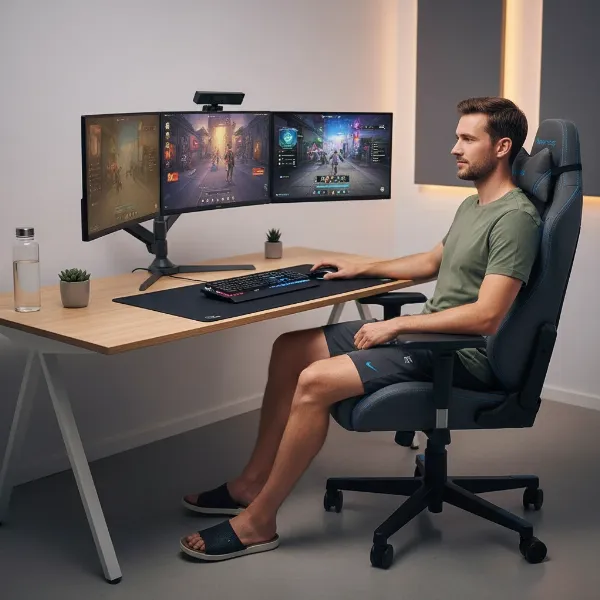
Is the annoying symphony of squeaks and creaks from your gaming chair interrupting your focus, disrupting your streams, or simply driving you mad? You’re not alone. Many gamers and desk warriors eventually face the dreaded squeak. The good news is, you don’t always need to invest in a new chair. Often, a few simple adjustments and a little lubrication can transform your noisy battle station back into a silent, supportive throne in mere minutes. Let’s dive into how you can quiet that clamor and get back to your game in peace.
Understanding Your Squeaky Gaming Chair
Before you can fix a squeak, you need to understand why it’s happening and where it’s coming from. Gaming chairs, with their numerous adjustable parts and moving mechanisms, are prone to developing noises over time. This is often due to friction between components, loose connections, or the accumulation of dirt and debris.
Common culprits for squeaking include the chair’s wheels, the gas lift mechanism, the tilt and tension springs, the backrest, and various bolts and screws that hold the structure together. Identifying the exact source is the first crucial step. By methodically checking each area, you can pinpoint the problem and apply the right solution, often without disassembling your entire chair.
Essential Tools for a Quick Fix
To tackle most squeaky gaming chair issues efficiently, you’ll need a small arsenal of common household tools and a good lubricant. Having these on hand will ensure you can resolve the problem quickly, often within the promised five minutes.
Here’s what you’ll likely need:
- Screwdriver Set: A multi-bit screwdriver or a set of Allen keys (hex wrenches) is essential for tightening loose bolts and screws. Most gaming chairs use Allen bolts.
- Lubricant: This is your primary weapon against friction.
- WD-40 or Silicone Spray: These are widely available and effective for general lubrication of metal-on-metal parts. Silicone spray is often preferred for plastic components as it won’t degrade them.
- Powdered Graphite: A solid lubricant that doesn’t attract dust, ideal for internal mechanisms or hard-to-reach areas.
- Light Machine Oil/Grease: For more substantial lubrication, especially after removing bolts for a thorough application.
- Rag or Microfiber Cloth: To wipe away excess lubricant and clean dusty areas.
- Flashlight (Optional but Recommended): To illuminate dark areas under the chair and inspect mechanisms closely.
Step-by-Step Guide to Silence Your Chair in 5 Minutes
Ready to get rid of that annoying squeak? Follow these steps, focusing on quick identification and targeted application to get your gaming chair quiet again in no time.
Step 1: Pinpoint the Squeak’s Origin
|
Our Picks for the Best Gaming Chair in 2026
As an Amazon Associate I earn from qualifying purchases.
|
||
| Num | Product | Action |
|---|---|---|
| 1 | Gaming Chair, 400 lbs Adult Chair, High Back Computer Chair with Footrest and Linked Armrests, Office Video Game Chair with Lumbar Support (Grey) |

|
| 2 | BestOffice High-Back Gaming Chair PC Office Chair Computer Racing Chair PU Desk Task Chair Ergonomic Executive Swivel Rolling Chair with Lumbar Support for Back Pain Women, Men,White |
|
| 3 | GTPLAYER Gaming Chair,Office Chair with Pocket Spring Lumbar Support, Ergonomic Comfortable Wide Office Desk Computer Chair with Outward Fixed Soft Armrests and Footrest (PU Leather, Black) |
|
| 4 | Sweetcrispy Computer Gaming Desk Chair - Ergonomic PU Leather with Comfy Lumbar Support, Height Adjustable Rolling Desk with Flip-up Armrests, for Home and Office |
|
| 5 | BestOffice Gaming Chair Office Chair Ergonomic Desk Chair Racing Style Gaming Chair with Lumbar Support, Swivel Rolling Base, and Comfortable Padded Seat for Women and Men |
|
| 6 | Ergonomic Office Chair with Footrest - Adjustable Lumbar Support & Headrest, 90-160° Reclining Mesh Back Computer Chair - Home Office/Gaming, 350lbs Capacity (SGS Certified) |
|
| 7 | Razer Iskur V2 X Ergonomic Gaming Chair: Built-in Lumbar Support - Widened Seat Base - High Density Foam Cushions - Adjustable 152 Degree Recline - 2D Armrests - Plush Fabric Finish - Black |
|
| 8 | TRALT Office Chair Ergonomic Desk Chair, 330 LBS Home Mesh Office Desk Chairs with Wheels, Comfortable Gaming Chair, High Back Office Chair for Long Hours (White) |
|
| 9 | Breathable Fabric Gaming Chair with Footrest, Height Adjustable Game Chair, Video Gaming Chair for Gaming Room, Living Room and Office - Blue/Light Grey |
|
| 10 | Gaming Chair with Linkage Armrest & Footrest, High Back Video Gaming Chair, Black/White |
|
The most critical step is to find exactly where the sound is coming from. Sit in your chair and move around. Lean back, lean forward, swivel left and right, and bounce lightly. Pay close attention to any sounds. Does it squeak when you lean back? Is it when you swivel? Or when you shift your weight? This diagnostic phase will save you time and ensure you target the right area. Sometimes, a friend can help by listening from different angles as you move.
Step 2: Tighten All Loose Connections
Many squeaks arise from simple loose hardware. Start by turning your gaming chair upside down or tilting it on its side to access the base. Using your screwdriver or Allen key set, carefully go over every visible bolt, nut, and screw. Tighten them clockwise until snug, but avoid overtightening, which can strip threads or damage components. Pay special attention to the bolts connecting the seat to the backrest, the armrests to the seat, and the chair’s base plate to the gas lift mechanism.
Step 3: Lubricate the Main Mechanisms
Once all connections are tight, it’s time to lubricate. Different parts require different approaches.
- Gas Lift & Swivel Mechanism: These are frequent sources of noise. Turn the chair over and spray lubricant generously around the top and bottom of the gas lift cylinder where it meets the chair base and the star base. Swivel the chair several times to help the lubricant work its way into the mechanism.
- Tilt Mechanism & Tension Spring: If your chair squeaks when you lean back, the tilt mechanism or its tension spring is likely the culprit. Locate the large turn-knob beneath your seat that adjusts tilt tension. Loosen it a bit, and then apply lubricant directly to the exposed spring inside its housing. Work the tilt function back and forth to distribute the lubricant.
- Armrests: Some armrests have pivots or attachment points that can squeak. If they’re a source of noise, apply a small amount of silicone lubricant to their pivot points or where they connect to the chair.
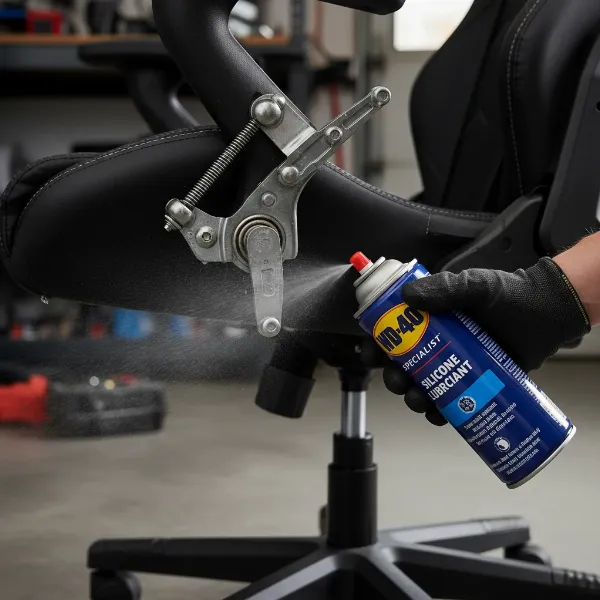 A hand applying lubricant to the underside mechanism of a black gaming chair.
Step 4: Silence Squeaky Wheels
Don’t overlook the casters! Wheels can accumulate hair, dirt, and dust, leading to annoying squeaks as they roll or swivel. Invert your chair again. Inspect each wheel for debris and remove any you find. Then, spray a lubricating agent directly into the axle of each wheel where it attaches to the chair’s base and also into the swivel mechanism of the caster itself. Flip the chair upright and roll it around, moving in different directions, to ensure the lubricant spreads evenly.
Step 5: Test and Re-Lubricate if Needed
After you’ve tightened and lubricated, sit back in your chair and give it a thorough test. Move around, lean back, swivel, and mimic the movements that originally caused the squeak. If you still hear a faint noise, try to pinpoint it more precisely and apply a bit more lubricant to that specific area. Often, a second, more targeted application can resolve any lingering sounds. Patience here can lead to complete silence.
Pro Tips for Long-Lasting Silence
While the 5-minute fix is incredibly effective, a bit of preventative care can keep your gaming chair quiet for even longer.
- Regular Maintenance: Make it a habit to check and tighten your chair’s bolts every few months. A quick visual inspection and snugging up loose fasteners can prevent squeaks from developing.
- Treat Your Chair Gently: Abruptly dropping into your chair, jumping on it, or applying excessive force can stress its components and accelerate wear, leading to more squeaks.
- Choose the Right Lubricant: While WD-40 is a popular choice, consider silicone-based sprays for plastic parts to avoid potential damage, and powdered graphite for areas where you want to avoid liquid residue that could attract dust.
> “Fixing a squeaking noise in your gaming or office chair is not a difficult task. It is actually something that you should be used to, especially after months and years of sitting on your chair.” – Carl Chamoiseau, Founder & Editor at TopGamingChair.com
Conclusion
A squeaky gaming chair can be a frustrating distraction, but with the right approach, it’s a problem you can solve quickly and easily. By systematically identifying the source of the noise, tightening any loose connections, and applying appropriate lubrication to the moving parts, you can often restore your chair to its silent, supportive glory in as little as five minutes. Don’t let a minor annoyance detract from your gaming or productivity. A little DIY effort is all it takes to enjoy uninterrupted comfort and focus once more.
Has your gaming chair been making odd noises lately? What quick fixes have you found most effective?
Frequently Asked Questions
What causes a gaming chair to squeak?
Squeaking in gaming chairs is typically caused by friction between metal parts, loose bolts or screws, or accumulation of dirt and debris in moving mechanisms like the wheels, gas lift, or tilt spring. Regular use naturally wears down components, increasing the chances of developing these annoying noises over time.
What kind of lubricant should I use for my squeaky gaming chair?
For most metal-on-metal contact points, a silicone-based spray lubricant or WD-40 works well. For areas where you want to avoid attracting dust, powdered graphite is an excellent alternative. Always wipe away excess lubricant with a rag to prevent mess and dirt buildup.
Can olive oil fix a squeaky chair?
While olive oil might temporarily reduce a squeak due to its lubricating properties, it’s generally not recommended for long-term use on Gaming Chairs. It can attract dust and grime, potentially leading to more severe issues and stickiness over time, unlike dedicated lubricants designed for mechanical parts.
How often should I lubricate my gaming chair?
The frequency depends on how often you use your chair and if it starts to show signs of squeaking. As a general rule, a thorough inspection and lubrication every 6-12 months can prevent most noises. If you hear a squeak, address it immediately to prevent further wear and tear.
What if my gaming chair still squeaks after I’ve tried everything?
If your chair continues to squeak after tightening all fasteners and lubricating all moving parts (wheels, gas lift, tilt mechanism, backrest spring), the issue might be internal to a sealed component like the gas lift piston. In such cases, contacting the manufacturer’s support or considering a replacement part might be necessary.