The thrill of a late-night raid or a competitive esports match can quickly turn into the agonizing stiffness and throbbing ache in your neck. If prolonged gaming sessions leave you reaching for painkillers and craning your head, you’re not alone. The invisible enemy is often poor posture, leading to what’s commonly known as “tech neck,” a pervasive issue among gamers. But what if your gaming setup, specifically your chair, could be the ultimate weapon in this battle? Choosing and properly adjusting an ergonomic gaming chair is not just about comfort; it’s a critical investment in your long-term neck health. This comprehensive guide will equip you with the knowledge to transform your gaming chair into an ally against neck pain, ensuring your focus remains on the game, not the discomfort.
Understanding Gaming-Related Neck Pain
Gaming-related neck pain is a prevalent issue stemming from the prolonged static postures often adopted during intense sessions. When you lean forward, slouch, or crane your neck to view your monitor, you put excessive strain on your cervical spine, the delicate structure of bones, ligaments, and muscles in your neck. This consistent stress can lead to muscle fatigue, stiffness, headaches, and chronic discomfort. The “tech neck” phenomenon, characterized by the forward jutting of the head, exacerbates these problems, placing immense pressure on the neck muscles and discs as the head’s weight effectively increases with every inch it moves forward. Common culprits include incorrect monitor height, inadequate chair support, and simply being too engrossed to notice your deteriorating posture.
The Gaming Chair Advantage: Beyond Aesthetics
A gaming chair is far more than just a stylish seat with flashy colors. At its core, an ergonomic gaming chair is designed to provide optimal support and comfort for extended periods of sitting, making it an indispensable tool for gamers. While traditional office chairs aim for general ergonomics, gaming chairs often feature a more aggressive, high-backed design, inspired by racing car seats, providing comprehensive support for the entire back, including the head and neck. This specialized design helps maintain the spine’s natural curvature, promoting better posture and significantly reducing the strain that leads to neck pain. The evolution of gaming chairs reflects a growing understanding of gamer physiology, moving beyond basic seating to integrate advanced adjustability and support systems tailored to the unique demands of competitive and casual play.
Key Ergonomic Features for Neck Pain Relief
When battling neck pain, specific ergonomic features in a gaming chair become invaluable. These aren’t just add-ons; they are fundamental components that work together to promote proper spinal alignment and reduce strain.
High Backrest
|
Our Picks for the Best Gaming Chair in 2026
As an Amazon Associate I earn from qualifying purchases.
|
||
| Num | Product | Action |
|---|---|---|
| 1 | GTPLAYER Gaming Chair,Office Chair with Pocket Spring Lumbar Support, Ergonomic Comfortable Wide Office Desk Computer Chair with Outward Fixed Soft Armrests and Footrest (PU Leather, Black) |

|
| 2 | BestOffice High-Back Gaming Chair PC Office Chair Computer Racing Chair PU Desk Task Chair Ergonomic Executive Swivel Rolling Chair with Lumbar Support for Back Pain Women, Men,White |
|
| 3 | BestOffice Gaming Chair Office Chair Ergonomic Desk Chair Racing Style Gaming Chair with Lumbar Support, Swivel Rolling Base, and Comfortable Padded Seat for Women and Men |
|
| 4 | Breathable Fabric Gaming Chair with Footrest, Height Adjustable Game Chair, Video Gaming Chair for Gaming Room, Living Room and Office - Blue/Light Grey |
|
| 5 | Gaming Chair with Linkage Armrest & Footrest, High Back Video Gaming Chair, Black/White |
|
| 6 | Ergonomic Office Chair with Footrest - Adjustable Lumbar Support & Headrest, 90-160° Reclining Mesh Back Computer Chair - Home Office/Gaming, 350lbs Capacity (SGS Certified) |
|
| 7 | TRALT Office Chair Ergonomic Desk Chair, 330 LBS Home Mesh Office Desk Chairs with Wheels, Comfortable Gaming Chair, High Back Office Chair for Long Hours (White) |
|
| 8 | Sweetcrispy Computer Gaming Desk Chair - Ergonomic PU Leather with Comfy Lumbar Support, Height Adjustable Rolling Desk with Flip-up Armrests, for Home and Office |
|
| 9 | Razer Iskur V2 X Ergonomic Gaming Chair: Built-in Lumbar Support - Widened Seat Base - High Density Foam Cushions - Adjustable 152 Degree Recline - 2D Armrests - Plush Fabric Finish - Black |
|
| 10 | Gaming Chair, 400 lbs Adult Chair, High Back Computer Chair with Footrest and Linked Armrests, Office Video Game Chair with Lumbar Support (Grey) |
|
The cornerstone of a neck-friendly gaming chair is a high backrest. Unlike standard office chairs that might only support your lower back, a quality gaming chair’s backrest extends high enough to support your entire back, including your upper back and shoulders, often reaching 30 to 33 inches in height. This comprehensive support ensures that your spine remains aligned from your tailbone to the base of your skull, preventing the slumping and hunching that contribute to neck and shoulder tension.
Adjustable Headrest/Neck Pillow
A well-designed headrest or neck pillow is crucial for supporting the natural cervical curve of your neck. It should cradle the base of your skull, providing a gentle contact point without pushing your head forward. While it serves as a posture cue, reminding you to keep your head aligned, its primary benefit often comes during moments of recline, allowing your neck muscles to relax fully. Many high-end gaming chairs include memory foam neck pillows that adapt to your unique curvature, offering personalized support and alleviating pressure points.
Lumbar Support
While directly supporting the lower back, effective lumbar support plays an indirect yet vital role in preventing neck pain. By maintaining the natural inward curve of your lower spine, lumbar support prevents your pelvis from rotating backward, which in turn stops your upper spine from slouching and your head from jutting forward. Adjustable lumbar support, whether a built-in mechanism or an adjustable cushion, allows you to customize the support to your body’s specific needs, promoting an upright posture that naturally lessens strain on your neck.
Recline and Tilt Mechanism
The ability to recline and tilt your gaming chair is more than just a luxury; it’s an ergonomic necessity. A flexible recline and tilt mechanism allows for dynamic movement, which is essential for spinal health. You can switch between an upright posture (typically 95-110 degrees) for focused gameplay and a more relaxed, reclined position (110-135 degrees) during breaks or cutscenes. This dynamic movement helps redistribute pressure on your spinal discs, improves blood circulation, and allows your neck and back muscles to relax, preventing stiffness and fatigue from prolonged static sitting.
Adjustable Armrests (3D/4D)
Often overlooked, fully adjustable armrests (3D or 4D, allowing height, depth, width, and pivot adjustments) are critical for preventing neck and shoulder pain. When your armrests are set correctly, supporting your forearms so your elbows are bent at roughly a 90-degree angle and your shoulders are relaxed, they take the strain off your upper trapezius muscles. This prevents you from hunching forward or shrugging your shoulders, directly reducing tension that can radiate up into your neck. They should also be level with your desk height to create a seamless ergonomic workspace.
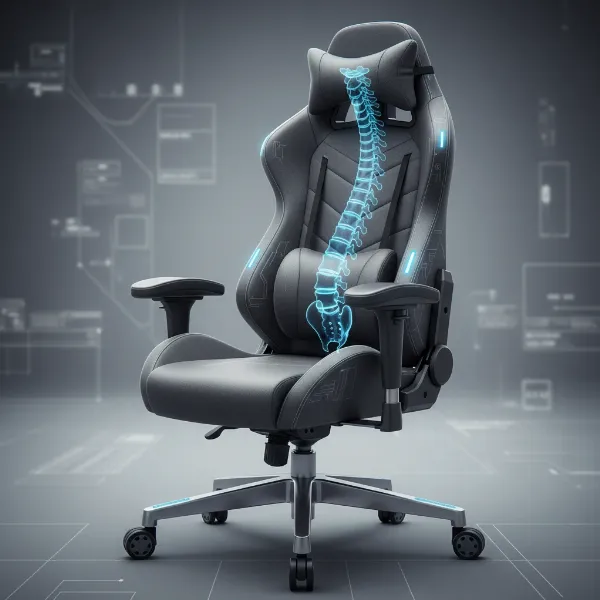 An ergonomic gaming chair with adjustable headrest and lumbar support, designed for optimal neck health and posture during long gaming sessions.
Optimizing Your Gaming Chair Setup for Neck Health
Having a feature-rich gaming chair is only half the battle; proper adjustment is paramount to unlocking its full potential for neck pain relief. Even the best ergonomic chair can cause discomfort if not set up correctly. Here’s a step-by-step guide to fine-tuning your throne:
- Set Your Seat Height: Begin by adjusting the seat height so your feet rest flat on the floor, with your knees forming a roughly 90-degree angle. Your thighs should be parallel to the ground. If your feet dangle, use a footrest. This foundation promotes healthy circulation and reduces pressure on your lower back, indirectly aiding neck posture.
- Adjust the Seat Depth: Slide your hips all the way back into the chair. There should be a small gap—about two to three fingers’ width—between the front edge of the seat and the back of your knees. This prevents the seat from cutting off circulation to your lower legs and ensures your back is fully supported by the backrest.
- Dial in Your Lumbar Support: Position the lumbar support (whether built-in or a cushion) to fit snugly into the natural inward curve of your lower back, typically around your beltline. It should provide a gentle “hug,” not a harsh push. This crucial adjustment prevents slouching and maintains the natural “S” curve of your spine, which is foundational for proper upper body and neck alignment.
- Position Your Armrests: Adjust your armrests so your shoulders are relaxed, and your elbows are bent at a 90-degree angle, close to your body. They should be at the same height as your desk, allowing your forearms to rest comfortably and reducing strain on your shoulders and neck.
- Refine the Headrest: The headrest or neck pillow should cradle the base of your skull and support the natural curve of your neck without forcing your head forward. It’s often most beneficial when you recline, allowing your neck to rest. In an upright position, it primarily acts as a reminder for neutral head posture.
- Optimize Monitor Position: Your monitor should be positioned so the top third of the screen is at eye level, and it’s about an arm’s length away. This minimizes eye strain and prevents you from craning your neck up or down, a major contributor to “tech neck.”
Beyond the Chair: Complementary Strategies
While your gaming chair is a powerful ally, it’s part of a larger ergonomic ecosystem. To truly conquer neck pain, integrate these complementary strategies into your gaming routine:
- Movement Breaks: The human body isn’t designed for prolonged static sitting. Take short breaks every 30-60 minutes. Stand up, walk around, grab a drink, or simply stretch. This improves blood circulation, keeps muscles active, and reduces the cumulative strain of sitting.
- Targeted Stretches: Incorporate simple neck and shoulder stretches throughout your day.
- Chin Tucks: Sit upright, gently tuck your chin toward your chest, holding for a few seconds. Repeat 10 times.
- Neck Side Stretch: Gently tilt your head to one side, bringing your ear toward your shoulder, holding for 20-30 seconds each side.
- Shoulder Rolls: Roll your shoulders backward 10 times, then forward 10 times to release tension.
- Stay Hydrated: Water is essential for every bodily function, including maintaining the elasticity of your spinal discs and muscles. Proper hydration can help prevent muscle cramps and stiffness.
- Practice Mindful Posture: Even with the perfect chair, active awareness of your posture is key. Periodically check in with yourself: Is your head over your shoulders? Is your back against the chair? Are your shoulders relaxed?
Choosing the Right Gaming Chair: A Buying Guide
Navigating the vast market of gaming chairs can be daunting, but with neck pain relief as your priority, here’s a focused buying guide:
- Identify Your Needs and Budget: Consider your body type (height and weight), the amount of time you spend gaming, and your budget. Some chairs are designed for smaller frames, others for larger users. Your budget will determine the range of adjustability and material quality.
- Prioritize Adjustability: Look for chairs with comprehensive adjustment options. The more ways you can customize the seat height, depth, recline, lumbar support, and armrests, the better you can tailor it to your unique body and ergonomic needs.
- Material Matters: Consider the material based on comfort, durability, and breathability. PU leather is common but can get warm; fabric offers breathability and a softer feel; mesh provides excellent ventilation, which is ideal for warmer climates or long sessions.
- Brand Reputation and Reviews: Research reputable brands known for their ergonomic designs and build quality. Read reviews from other gamers, paying close attention to feedback regarding neck and back support for users with similar body types.
- Try Before You Buy (If Possible): If feasible, visit a store to sit in different chairs. Feel how the lumbar and headrest support your spine and neck. Test the adjustability to ensure it meets your comfort requirements.
Top Picks – Gaming Chair Categories for Neck Pain Relief
While specific models constantly evolve, here are categories of gaming chairs that excel in neck pain relief:
- Entry-Level Ergonomic: These chairs focus on fundamental adjustability, offering solid high backrests, basic lumbar support, and often a removable neck pillow. They provide a significant upgrade over standard office chairs for those on a tighter budget, emphasizing core posture principles.
- Mid-Range All-Rounders: Stepping up, these chairs feature more advanced adjustment mechanisms, better quality materials (like higher-density foam or more durable PU leather), and often 3D/4D armrests. Their headrests are typically more integrated or offer superior contouring, providing enhanced cervical support for serious gamers.
- Premium Ergonomic Beasts: At the pinnacle, these chairs incorporate top-tier adjustability, premium materials (such as real leather or high-grade fabric), advanced synchro-tilt mechanisms, and often highly customizable built-in lumbar and headrest systems. They are designed for long-term health and maximum comfort, offering the most tailored fit to address and prevent neck pain effectively.
In the pursuit of gaming excellence, your physical well-being should never be an afterthought. Your gaming chair is a vital piece of equipment that, when chosen and adjusted correctly, can be your ultimate defense against debilitating neck pain. By understanding the ergonomic features that provide crucial cervical support, optimizing your setup with precise adjustments, and integrating healthy habits like regular breaks and stretches, you empower yourself to game longer, perform better, and live pain-free. Investing in a quality ergonomic gaming chair and committing to proper posture isn’t just about preventing discomfort; it’s about safeguarding your passion for years to come. What will be your first adjustment to elevate your gaming comfort and conquer neck pain?
Frequently Asked Questions
Can a gaming chair worsen neck pain?
Yes, a gaming chair can worsen neck pain if it’s improperly adjusted or if you maintain poor posture while sitting in it. An incorrectly positioned headrest, for example, can push your head forward, exacerbating “tech neck” and increasing strain on your cervical spine. Proper setup and mindful posture are crucial.
How often should I take breaks to prevent neck pain?
To effectively prevent neck pain and reduce the strain from prolonged sitting, it is recommended to take short movement breaks every 30 to 60 minutes. Stand up, walk around, and perform simple stretches to improve circulation and relax your muscles.
Is a gaming chair headrest really necessary for neck support?
A Gaming Chair headrest is highly beneficial for providing cervical support and acting as a posture cue, especially when reclining or taking short breaks. While not always necessary for continuous upright support, a properly adjusted headrest cradles the base of your skull and supports the natural curve of your neck, contributing to overall comfort and pain prevention.
What’s the ideal monitor height to prevent tech neck?
The ideal monitor height to prevent “tech neck” is when the top third of your screen is at or slightly below eye level. This positioning allows you to view the entire screen without craning your neck up or down, promoting a neutral neck posture. Ensure the monitor is also about an arm’s length away for optimal viewing distance.