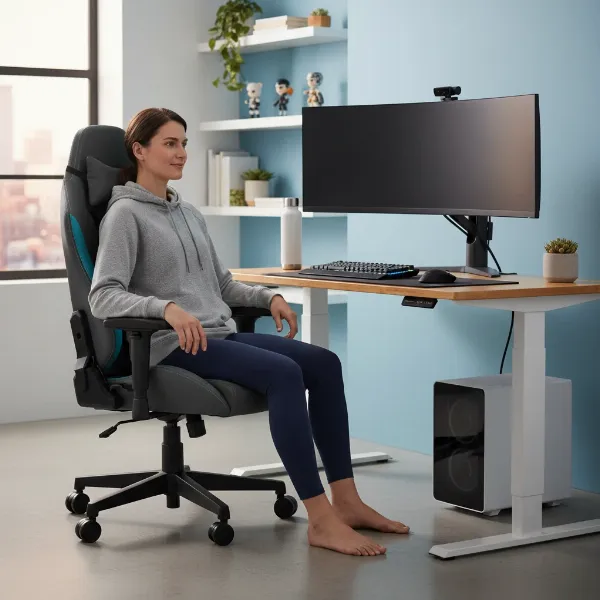
As Admin of GamingChairTech.com with over a decade of hands-on experience, I’ve seen countless debates about what truly makes a gaming chair ergonomic. One of the most persistent questions revolves around the headrest: is it a critical component for proper posture and comfort, or an overrated feature? The answer, like many things in ergonomics, is nuanced, depending heavily on your gaming style, physical needs, and the design of the headrest itself.
Understanding Gaming Chair Headrests and Their Purpose
Many people instinctively associate a headrest with comfort, believing its primary role is to provide a place to rest their head. While partially true, the ergonomic function of a headrest is more precisely defined as “neck support.” Its main purpose is to support the cervical spine—the upper seven vertebrae of your neck—and the base of your skull. It’s not meant to bear the full weight of your head constantly, especially during active, upright gameplay. Instead, it serves to reduce static muscular load on the neck during periods of rest or when you recline.
A common misconception is that a gaming headrest is similar to an automotive head restraint. However, automotive head restraints are safety devices designed to prevent whiplash during collisions, built to withstand high-force impacts. A gaming chair headrest, conversely, is engineered to manage low-intensity, long-duration static loads, prioritizing adjustability and comfort for healthy posture rather than crash protection.
The Ergonomic Benefits of a Well-Designed Headrest
When correctly designed and adjusted, a headrest can offer significant ergonomic advantages for gamers, especially during extended sessions.
- Reducing Neck Strain and Fatigue: Your head is heavy, weighing approximately 10-12 pounds in a neutral position. Leaning forward, even slightly, drastically increases the load on your cervical spine. A headrest provides a contact point that allows your neck muscles to relax intermittently, offloading this static strain and reducing fatigue over long hours of gaming.
- Supporting Proper Posture When Reclining: For gamers who enjoy immersive single-player titles, strategy games, or watching cutscenes, reclining is a common posture. In a reclined position, a headrest becomes invaluable, supporting the natural curve of your neck and aligning your head with your spine. This helps decompress the spine and maintain a healthy, relaxed posture.
- Aligning Head and Neck with the Spine: An effective headrest cradles the natural curve behind your upper neck and the base of your skull (occiput). This gentle support helps prevent your head from jutting forward, a common issue known as “tech neck,” promoting a more neutral spinal alignment.
- Benefits for Specific Users: Individuals who sit for long hours with minimal movement, suffer from chronic neck pain or upper back tension, or are taller and require more upper chair support will often find a well-adjusted headrest particularly beneficial.
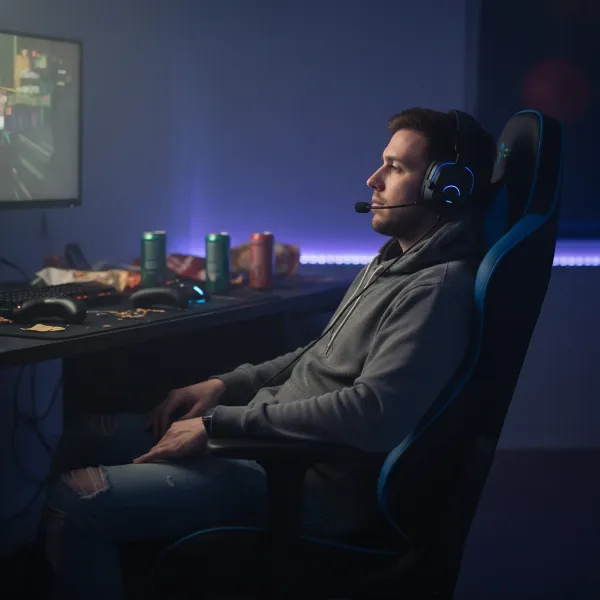 Ergonomic gaming chair headrest supporting a gamer's neck during a relaxed, reclined position, emphasizing comfort and proper alignment.
When a Headrest Becomes Detrimental
While beneficial, a headrest can be counterproductive if not chosen or used correctly. A poorly designed or improperly adjusted headrest can exacerbate neck issues rather than alleviate them.
- Fixed Headrests that Don’t Fit: Many budget-friendly gaming chairs feature fixed headrests that offer minimal or no adjustment. If this fixed position doesn’t align with your body’s unique dimensions and the natural curve of your neck, it can force your head into an unnatural or forward-jutting posture, leading to discomfort and increased strain.
- Headrests that Force Forward Head Posture: An overly thick or aggressively shaped headrest that pushes your head forward can be worse than no headrest at all. This forces your chin towards your chest, altering spinal alignment and contributing to “tech neck.” The ideal headrest provides gentle contact, filling the natural curve without pushing your head.
- Limiting Natural Movement: Sustained, static postures can reduce the natural flexibility of the neck. A headrest that locks you into one position, preventing small, natural micro-movements, can lead to stiffness. An effective headrest should allow for these subtle shifts while providing support when needed.
Key Factors for Choosing an Ergonomic Gaming Chair Headrest
If you decide a headrest is right for your gaming setup, focusing on these critical factors will help you make an informed choice.
Adjustability
The degree of adjustability is paramount. For a headrest to be truly ergonomic, it needs to adapt to your unique body shape and various postures. Look for:
- Height Adjustment: The ability to move the headrest up or down is crucial to ensure it cradles the base of your skull (occiput) and the top of your neck, supporting the natural cervical curve.
- Depth (Fore/Aft) Adjustment: This allows you to move the headrest forward or backward, ensuring gentle contact without pushing your head. There should be no pressure on the back of your head when sitting upright.
- Tilt/Angle Adjustment: The ability to angle the headrest helps align it with your head’s natural position, avoiding pressure points. A slight tilt (e.g., 0-10° for upright, 10-20° for reclined) often works best.
|
Our Picks for the Best Gaming Chair in 2026
As an Amazon Associate I earn from qualifying purchases.
|
||
| Num | Product | Action |
|---|---|---|
| 1 | Razer Iskur V2 X Ergonomic Gaming Chair: Built-in Lumbar Support - Widened Seat Base - High Density Foam Cushions - Adjustable 152 Degree Recline - 2D Armrests - Plush Fabric Finish - Black |

|
| 2 | TRALT Office Chair Ergonomic Desk Chair, 330 LBS Home Mesh Office Desk Chairs with Wheels, Comfortable Gaming Chair, High Back Office Chair for Long Hours (White) |
|
| 3 | Gaming Chair, 400 lbs Adult Chair, High Back Computer Chair with Footrest and Linked Armrests, Office Video Game Chair with Lumbar Support (Grey) |
|
| 4 | GTPLAYER Gaming Chair,Office Chair with Pocket Spring Lumbar Support, Ergonomic Comfortable Wide Office Desk Computer Chair with Outward Fixed Soft Armrests and Footrest (PU Leather, Black) |
|
| 5 | BestOffice High-Back Gaming Chair PC Office Chair Computer Racing Chair PU Desk Task Chair Ergonomic Executive Swivel Rolling Chair with Lumbar Support for Back Pain Women, Men,White |
|
| 6 | Breathable Fabric Gaming Chair with Footrest, Height Adjustable Game Chair, Video Gaming Chair for Gaming Room, Living Room and Office - Blue/Light Grey |
|
| 7 | BestOffice Gaming Chair Office Chair Ergonomic Desk Chair Racing Style Gaming Chair with Lumbar Support, Swivel Rolling Base, and Comfortable Padded Seat for Women and Men |
|
| 8 | Sweetcrispy Computer Gaming Desk Chair - Ergonomic PU Leather with Comfy Lumbar Support, Height Adjustable Rolling Desk with Flip-up Armrests, for Home and Office |
|
| 9 | Gaming Chair with Linkage Armrest & Footrest, High Back Video Gaming Chair, Black/White |
|
| 10 | Ergonomic Office Chair with Footrest - Adjustable Lumbar Support & Headrest, 90-160° Reclining Mesh Back Computer Chair - Home Office/Gaming, 350lbs Capacity (SGS Certified) |
|
Design and Placement
The design and placement dictate the effectiveness of neck support. The headrest should support the cervical curve of the spine, not necessarily the entire back of your head constantly. It should fit the natural curve behind your neck, not push your chin down. Proper placement ensures that when you lean back, your head and neck are aligned, rather than forced out of alignment.
Material and Comfort
While subjective, the material and cushioning play a role in comfort.
- Material: Breathable fabrics or mesh can prevent heat buildup during long sessions.
- Cushioning: Avoid overly plush or thick pillows, which can push your head forward. The cushioning should be supportive yet soft enough to be comfortable, filling the natural curve without creating undue pressure.
Integration vs. Add-on
Gaming chairs come with either integrated headrests or offer them as add-ons (often pillows strapped to the chair).
- Integrated Headrests: These are generally more stable and designed to move with the chair’s recline, offering consistent support. Higher-end models often have more sophisticated integrated adjustment mechanisms.
- Add-on Pillows: While better than nothing, loose pillows can be a temporary fix. They may not offer the same stability or targeted support as a well-designed integrated headrest. However, some aftermarket headrests are specifically designed to enhance ergonomic chairs lacking a built-in option.
Optimizing Your Gaming Setup: Beyond the Headrest
Remember, the headrest is just one piece of the ergonomic puzzle. Its effectiveness is tied to the rest of your workstation setup.
- Monitor Height: Ensure the top third of your monitor is at or slightly below eye level. A monitor that is too low can lead to you craning your neck forward, rendering any headrest useless.
- Lumbar Support: Proper lower back support is foundational. It sets the curve for your entire spine. Without stable lumbar support, your thoracic and cervical spine will compensate, often leading to a slouched posture that a headrest cannot fix.
- Seat Height and Depth: Your feet should be flat on the floor, and your knees should be at a 90-degree angle. The seat depth should allow a few inches between the back of your knees and the seat edge.
- Armrests: Adjustable armrests that support your elbows at a 90-degree angle, with relaxed shoulders, reduce tension in your neck and upper back.
A headrest mitigates cervical load, but it relies on a correct spinal foundation provided by the lumbar support to be truly effective.
Expert Perspectives: To Headrest or Not to Headrest?
The consensus among ergonomics specialists is that a headrest is not universally “necessary” for active, upright desk work. In fact, for intense, lean-forward competitive gaming, you’re unlikely to be in contact with the headrest during active play. Your neck muscles are designed to hold your head upright.
However, for gamers who engage in long, immersive sessions, frequently recline during breaks, or suffer from pre-existing neck conditions, a highly adjustable and properly positioned headrest is immensely beneficial. It provides crucial support, allows for muscle relaxation, and helps maintain spinal alignment when resting or reclining.
> “A headrest’s primary function is to reduce static muscular load on the neck during periods of rest or in a reclined posture. Adjustment is everything: a poorly positioned headrest can be worse than no headrest at all.” – Ergonomics Specialist, Eureka Ergonomic
Ultimately, the choice depends on your personal gaming habits and needs. Prioritize a chair that offers a robust foundation of adjustability in its core components (seat, backrest, armrests). If you are someone who values long, immersive sessions or frequently leans back to relax, a well-designed, adjustable headrest will be an invaluable feature for your long-term comfort and well-being.
Conclusion
The question of whether a headrest is necessary for ergonomic gaming doesn’t have a simple yes or no answer. While your neck muscles are capable of supporting your head during active, upright play, a well-designed, adjustable headrest can significantly enhance comfort and reduce fatigue during periods of rest and recline. It acts as crucial support for your cervical spine, preventing strain and promoting healthy alignment when you’re not actively engaged at the keyboard and mouse.
The key lies in adjustability and proper positioning. A headrest that can be tailored to your body and gaming style will be a powerful ally against “tech neck” and long-term discomfort. Conversely, a fixed or ill-fitting headrest can do more harm than good. Consider your habits: do you frequently recline, take breaks, or have pre-existing neck pain? If so, investing in a gaming chair with a highly adjustable headrest, integrated as part of a comprehensive ergonomic design, could be a game-changer for your health and performance.
What are your gaming habits, and how important is neck support to your overall setup?
Frequently Asked Questions
Should my head actually rest on the headrest while gaming?
No, for active, upright gaming, your head should not constantly rest on the headrest. Its primary role is to support your neck and head during periods of rest or when reclining, allowing your neck muscles to relax and preventing fatigue.
What is the correct position for a gaming chair headrest?
The headrest should be adjusted so that its main curve gently cradles the base of your skull (occiput) and the top of your neck, supporting the natural cervical curve. It should not push your head forward or be too high or low.
Can a headrest worsen neck pain?
Yes, a headrest can worsen neck pain if it’s poorly designed, fixed in an incorrect position, or pushes your head forward, forcing an unnatural posture. Always opt for an adjustable headrest to ensure a personalized and ergonomic fit.
Are all gaming chairs designed with headrests?
No, while many modern gaming chairs include headrests, it’s not a universal feature. Some ergonomic chairs prioritize active posture and may not include a traditional headrest, or they might offer it as an optional add-on.
Is a gaming chair headrest the same as a car headrest?
No, a gaming chair headrest is not the same as a car headrest. Car headrests are primarily safety devices designed to prevent whiplash in collisions, whereas Gaming Chair headrests are ergonomic tools intended to provide support and reduce static load on the neck during seated use.