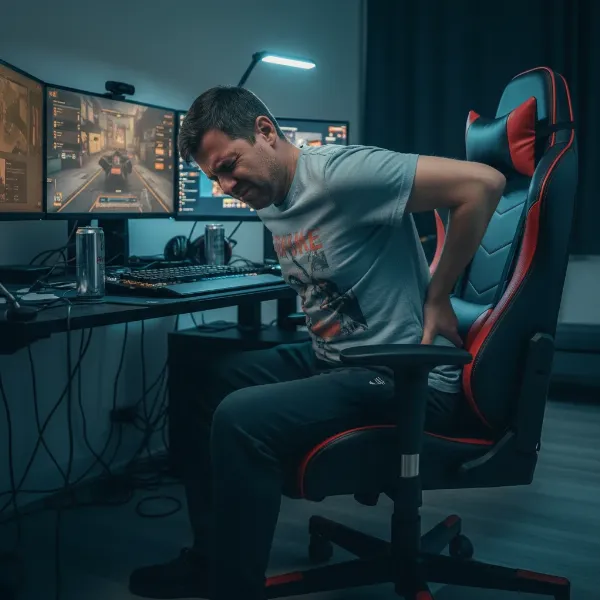
There’s little more frustrating than settling into your gaming chair, ready for an immersive session, only for it to slowly, or suddenly, sink to its lowest setting. This common issue plagues many chair owners, disrupting comfort and focus. While a sinking chair might seem like a major problem, understanding its causes and knowing the right solutions can restore your seating to its former glory, or at least provide a comfortable temporary fix. This guide will walk you through the reasons behind your chair’s decline and provide practical, step-by-step solutions to get you back to ergonomic perfection.
Understanding Why Your Gaming Chair Sinks
At the heart of every adjustable office and gaming chair is a component known as the gas lift or pneumatic cylinder. This is the primary mechanism responsible for allowing you to smoothly adjust your chair’s height. When your chair begins to sink inexplicably, it’s almost always an issue related to this crucial part. The gas lift functions using compressed gas, typically nitrogen, contained within a sealed cylinder. When you operate the height adjustment lever, a valve opens, allowing the gas to compress or expand, thus raising or lowering the chair.
The most common reasons for a gaming chair sinking revolve around the failure of this sealed system. Over time, or due to manufacturing defects, the seals within the gas lift can degrade or break, allowing the nitrogen gas to leak out. Once enough gas escapes, the lift can no longer maintain the pressure required to hold the chair at a desired height, leading to that frustrating descent. Other less common reasons can include a faulty lever mechanism that fails to engage the gas lift properly or general wear and tear of internal components.
The Crucial Role of the Gas Lift in Gaming Chairs
The gas lift, also known as the pneumatic cylinder or simply the piston, is arguably the most vital component governing your chair’s adjustability and comfort. It’s a telescopic cylinder that contains compressed gas, allowing for smooth vertical movement when activated. Without a functioning gas lift, your chair would essentially be a fixed-height seat, losing a core aspect of its ergonomic design.
Gas lifts are categorized by “classes,” typically ranging from Class 1 to Class 4. These classes indicate the quality, durability, and weight capacity of the cylinder.
- Class 1: Basic, suitable for light use and lower weight capacities.
- Class 2: Standard, found in many entry-level office chairs.
- Class 3: Higher quality, designed for more frequent use and increased weight support.
- Class 4: The highest quality, offering superior durability, greater weight capacity (often up to 350-400 lbs), and smoother operation, ideal for professional gaming chairs and heavy-duty use.
A higher class gas lift typically means better materials, more robust seals, and a longer lifespan. Signs of a failing gas lift are unmistakable: your chair will slowly or quickly sink after you’ve adjusted it, or it may not hold its height at all. You might also hear a slight hiss when the chair sinks, indicating a gas leak.
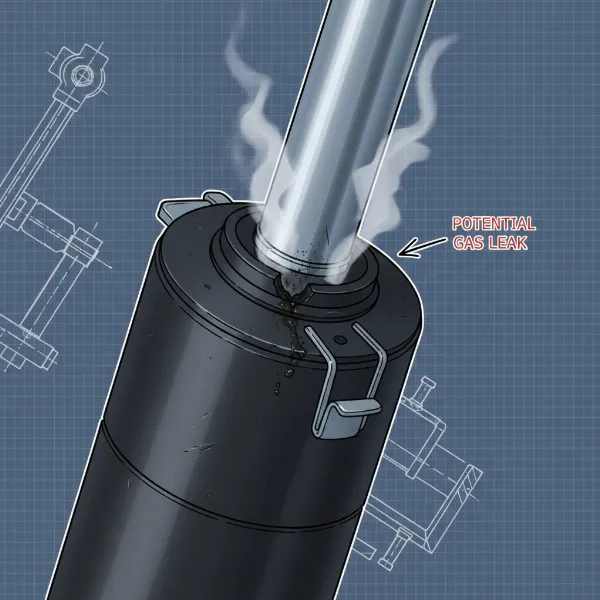 A close-up view of a gaming chair's gas lift mechanism showing a clear fault, with illustrative arrows pointing to where gas leakage might occur.
Diagnosing the Problem: Is Your Gas Lift to Blame?
Before you embark on any repair, it’s essential to correctly diagnose why your gaming chair keeps sinking. While the gas lift is the primary suspect, ruling out other possibilities will save you time and effort.
Testing the Gas Lift Functionality
|
Our Picks for the Best Gaming Chair in 2026
As an Amazon Associate I earn from qualifying purchases.
|
||
| Num | Product | Action |
|---|---|---|
| 1 | GTPLAYER Gaming Chair,Office Chair with Pocket Spring Lumbar Support, Ergonomic Comfortable Wide Office Desk Computer Chair with Outward Fixed Soft Armrests and Footrest (PU Leather, Black) |

|
| 2 | Sweetcrispy Computer Gaming Desk Chair - Ergonomic PU Leather with Comfy Lumbar Support, Height Adjustable Rolling Desk with Flip-up Armrests, for Home and Office |
|
| 3 | Gaming Chair, 400 lbs Adult Chair, High Back Computer Chair with Footrest and Linked Armrests, Office Video Game Chair with Lumbar Support (Grey) |
|
| 4 | BestOffice Gaming Chair Office Chair Ergonomic Desk Chair Racing Style Gaming Chair with Lumbar Support, Swivel Rolling Base, and Comfortable Padded Seat for Women and Men |
|
| 5 | Razer Iskur V2 X Ergonomic Gaming Chair: Built-in Lumbar Support - Widened Seat Base - High Density Foam Cushions - Adjustable 152 Degree Recline - 2D Armrests - Plush Fabric Finish - Black |
|
| 6 | Ergonomic Office Chair with Footrest - Adjustable Lumbar Support & Headrest, 90-160° Reclining Mesh Back Computer Chair - Home Office/Gaming, 350lbs Capacity (SGS Certified) |
|
| 7 | Gaming Chair with Linkage Armrest & Footrest, High Back Video Gaming Chair, Black/White |
|
| 8 | TRALT Office Chair Ergonomic Desk Chair, 330 LBS Home Mesh Office Desk Chairs with Wheels, Comfortable Gaming Chair, High Back Office Chair for Long Hours (White) |
|
| 9 | BestOffice High-Back Gaming Chair PC Office Chair Computer Racing Chair PU Desk Task Chair Ergonomic Executive Swivel Rolling Chair with Lumbar Support for Back Pain Women, Men,White |
|
| 10 | Breathable Fabric Gaming Chair with Footrest, Height Adjustable Game Chair, Video Gaming Chair for Gaming Room, Living Room and Office - Blue/Light Grey |
|
The most straightforward way to determine if your gas lift is faulty is to simply use the chair.
- Adjust the height: Raise the chair to its highest position.
- Apply weight: Sit in the chair.
- Observe: If the chair immediately or gradually starts sinking without you touching the lever, the gas lift is almost certainly the culprit.
To further confirm, try to manually push the chair down while standing. If it sinks easily with a light push, the seals are likely compromised. It’s also worth listening for any hissing sounds as the chair descends, which is a strong indicator of gas escaping. If the chair only sinks when the lever is pressed, and otherwise holds its height, the issue might be with the lever mechanism itself rather than the gas lift.
Other Potential Causes for a Sinking Chair
While less common, other issues can mimic a faulty gas lift:
- Loose Connections or Faulty Chair Mechanism: Sometimes, the lever mechanism that engages the gas lift might be loose or damaged. If the lever isn’t fully disengaging, it could be inadvertently releasing the gas. Check if the lever feels firm and responsive.
- Overloading the Chair: Every gaming chair has a specified weight capacity. Consistently exceeding this limit can put undue stress on the gas lift and other components, leading to premature failure. Always check the manufacturer’s specifications for your chair’s maximum weight support.
- General Wear and Tear of Components: Over many years of use, even the most robust chairs experience wear. Springs, bearings, or other small parts within the chair’s tilt or height adjustment mechanism can wear out, contributing to height instability. However, a complete sinking is still most often attributed to the gas lift.
Step-by-Step Guide to Fixing a Sinking Gaming Chair
Once you’ve confirmed that your gas lift is the problem, you have a couple of options: temporary fixes or a full replacement. A replacement is the most reliable long-term solution.
Temporary Fixes for a Sinking Chair
These methods offer a short-term reprieve, often buying you time before a permanent repair or replacement.
-
Using a Hose Clamp:
- Method: Raise your chair to your desired height. Locate the exposed part of the gas lift cylinder (the chrome or black pole). Wrap a metal hose clamp (available at hardware stores) tightly around the cylinder, just beneath the seat mechanism. Tighten it securely with a screwdriver.
- How it works: The clamp acts as a physical stop, preventing the gas lift from fully sinking past that point.
- Pros: Cheap, easy to install.
- Cons: Not adjustable after installation, can scratch the cylinder, often shifts over time.
-
PVC Pipe Method:
- Method: Measure the exposed length of your gas lift when the chair is at your preferred height. Purchase a PVC pipe with an inner diameter slightly larger than your gas lift cylinder. Cut the PVC pipe to the measured length. With the chair at its highest setting, slide the PVC pipe over the gas lift, resting it on the chair’s base.
- How it works: Similar to the clamp, the PVC pipe creates a rigid support column around the gas lift, preventing it from collapsing.
- Pros: More stable than a clamp, distributes weight more evenly.
- Cons: Not adjustable, requires precise measurement and cutting, can be bulky.
-
Rubber Rings/Shims:
- Method: This is similar to the hose clamp but uses multiple durable rubber rings or shims stacked around the gas lift cylinder to create a physical barrier.
- How it works: The rings provide a buffer that physically stops the cylinder from sinking beyond a certain point.
- Pros: Less likely to scratch the cylinder.
- Cons: Can be less stable than a clamp or pipe, may require multiple rings to achieve desired height.
Replacing a Faulty Gas Lift
Replacing the gas lift is the most effective and permanent solution. This process is manageable for most people with basic tools.
Tools Required:
- Wrench (adjustable or specific size for bolts)
- Rubber mallet or hammer
- Flathead screwdriver (optional, for prying)
- Gloves (for grip and protection)
- Lubricant spray (like WD-40, for stubborn parts)
- New gas lift (ensure it’s the correct class and dimensions for your chair)
Step-by-Step Removal of the Old Gas Lift:
-
Prepare the chair: Lay your gaming chair on its side on a soft surface to protect it and provide access to the base.
-
Remove the chair base (wheels): Most chair bases are attached to the gas lift by friction. Pull or wiggle the wheeled base away from the gas lift. If it’s stubborn, gently tap around the top of the base where it connects to the gas lift with a rubber mallet.
-
Remove the gas lift from the seat mechanism: The gas lift is inserted into a conical housing under the seat. This connection is also friction-fit. You’ll need to separate the gas lift from the seat mechanism.
- Turn the chair so the seat mechanism is facing up.
- Using a rubber mallet, gently but firmly tap the top of the gas lift (the narrow part that extends into the seat mechanism) downwards. You might need to strike a few times from different angles. Be careful not to damage the seat mechanism itself.
- Alternatively, if you can access the bottom of the seat plate, you might see a retaining clip or screws that hold the gas lift in place. Remove these if present. Some chairs require removing the entire seat plate to access the top of the gas lift for removal.
-
Clean up: Once the old gas lift is removed, clean any residue or debris from the openings in the chair base and the seat mechanism.
Installation of a New Gas Lift:
- Insert into seat mechanism: Insert the narrow end of the new gas lift into the hole in the bottom of your seat mechanism. It should slide in easily.
- Attach the chair base: Place the chair base (with wheels) over the wider end of the new gas lift.
- Secure: Carefully lower the chair onto the base, aligning the gas lift with the hole in the center of the base. Apply some weight by sitting on the chair to firmly seat the gas lift into both the mechanism and the base. This friction fit is what holds everything together.
- Test: Test the chair’s height adjustment to ensure it’s functioning correctly.
Tips for Choosing the Right Replacement Gas Lift:
- Class: Always aim for a Class 3 or Class 4 gas lift for gaming chairs for durability and smooth operation, especially if your original was a lower class.
- Dimensions: While most gas lifts are standardized, measure the diameter of your old gas lift (both ends) and its overall length (compressed and extended) to ensure compatibility.
- Weight Capacity: Choose a gas lift that matches or exceeds your chair’s original weight capacity, or even higher for added peace of mind.
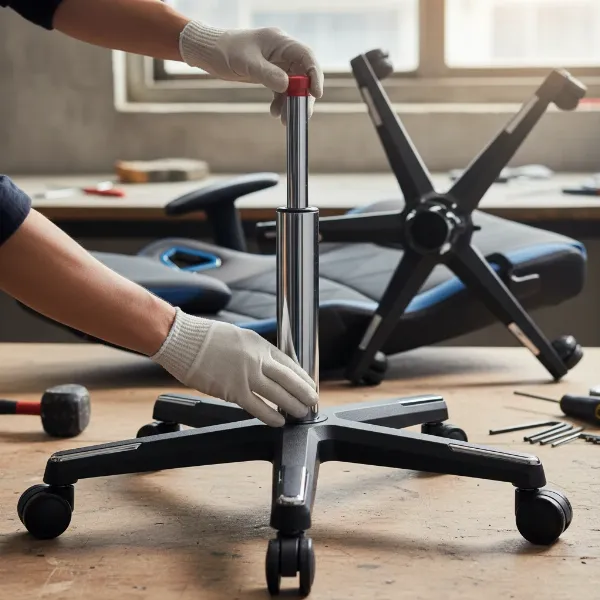 A person's hands installing a new gas lift into the base of a gaming chair, demonstrating the alignment and securing process.
Maintaining Your Gaming Chair to Prevent Sinking
Prevention is always better than cure. By adopting a few simple maintenance habits, you can significantly extend the life of your gaming chair’s gas lift and other components.
- Adhering to Weight Limits: This is perhaps the most critical factor. Always respect the manufacturer’s specified weight capacity for your chair. Overloading puts excessive strain on the gas lift, accelerating seal degradation and gas leakage. If you’re close to the limit, consider investing in a heavy-duty chair designed for higher capacities.
- Regular Cleaning and Lubrication: While the gas lift is a sealed unit, keeping the exterior clean and occasionally lubricating the moving parts of the height adjustment lever can prevent grit and grime from impeding its function. A little silicone spray on the lever mechanism can ensure smooth operation.
- Proper Use of Height Adjustment Lever: Avoid aggressively yanking or stomping on the height adjustment lever. Operate it smoothly and deliberately. When raising the chair, lean forward slightly to remove weight. When lowering, apply gentle pressure while activating the lever.
- Avoiding Rough Handling: Don’t use your gaming chair for activities it wasn’t designed for, such as standing on it or using it as a step stool. Such actions can apply uneven pressure and stress to the gas lift and other components, leading to premature failure. Treat your chair with care, and it will serve you faithfully for years.
When to Consider a New Gaming Chair
While fixing a sinking chair is often straightforward, there comes a point when repairs become less practical or economical. Knowing when to invest in a new gaming chair can save you time, effort, and potential frustration.
- When Repairs Are Too Costly or Complex: If multiple components are failing, or if the gas lift replacement process seems too daunting or requires specialized tools you don’t own, purchasing a new chair might be more sensible. Some high-end chairs might have proprietary parts that are difficult or expensive to source.
- When the Chair Has Reached Its End of Life: Beyond a sinking gas lift, if your chair’s upholstery is torn, foam padding is flattened, armrests are broken, or the frame is wobbly, it might be time for an upgrade. A chair that no longer provides adequate support can lead to discomfort and health issues.
- Advantages of Investing in a High-Quality Chair: A new, high-quality gaming chair offers numerous benefits. Modern designs often feature advanced ergonomics, more durable materials, and a higher class gas lift from the outset. Investing in a reputable brand with a good warranty can provide peace of mind and a superior, long-lasting seating experience. This is also an opportunity to choose a chair that better suits your current ergonomic needs and aesthetic preferences.
Conclusion
A sinking gaming chair is a common annoyance, but it’s typically a fixable problem rooted in a faulty gas lift. By understanding how these pneumatic cylinders work and recognizing the signs of failure, you can effectively diagnose the issue. Whether you opt for a temporary workaround like a hose clamp or dive into a full gas lift replacement, restoring your chair’s height adjustment is usually a straightforward process. Remember, consistent maintenance, adhering to weight limits, and proper usage are key to prolonging your chair’s lifespan and preventing future sinking issues. If repairs seem overwhelming or your chair has simply seen better days, considering a new, high-quality gaming chair is always a valid and often beneficial option. What steps will you take to ensure your gaming sessions remain comfortably elevated?
Frequently Asked Questions
Why do gas lifts fail?
Gas lifts primarily fail due to the degradation of internal seals, allowing the compressed nitrogen gas to leak out. This can happen over time due to normal wear and tear, manufacturing defects, or exceeding the chair’s weight capacity, which puts excessive stress on the seals.
Can I fix a gas lift without replacing it?
Temporary fixes like using a hose clamp or PVC pipe can physically prevent the chair from sinking, but they do not repair the internal mechanism of the gas lift. The only permanent fix for a truly faulty gas lift is replacement.
How long do gaming chair gas lifts last?
The lifespan of a gas lift varies greatly depending on its quality (Class 1-4), frequency of use, and adherence to weight limits. High-quality Class 4 gas lifts can last 5-10 years or even more, while lower-quality ones might fail within 1-3 years.
What class gas lift should I get for my gaming chair?
For optimal durability and smooth performance in a Gaming Chair, it is recommended to get a Class 3 or, preferably, a Class 4 gas lift. Class 4 cylinders offer the best strength, reliability, and weight capacity.
Is it dangerous if my gaming chair sinks?
While generally not dangerous, a suddenly sinking chair can cause a jolt that might startle or momentarily unbalance you. The main concern is usually discomfort and potential ergonomic issues if you’re forced to sit at an improper height for extended periods.