Few things are as disruptive to an immersive gaming session or focused work sprint as a wobbly armrest on your gaming chair. That annoying shake, creak, or tilt not only compromises your comfort and concentration but can also signal deeper structural issues that, if ignored, might lead to more significant damage. But before you consider ditching your beloved battle station, know that most wobbly armrest woes are surprisingly simple to fix with a few basic tools and a bit of know-how. This guide will walk you through identifying the problem, gathering the right equipment, and applying effective solutions to restore your gaming chair’s stability, comfort, and longevity.
Understanding Wobbly Gaming Chair Armrests
A wobbly armrest refers to any instability or excessive movement in the arm support of your gaming chair beyond its intended adjustability. This can manifest as side-to-side play, a loose feeling when applying pressure, or even an armrest that sags or rotates freely. Recognizing these symptoms early is crucial for effective intervention.
The most common culprit behind a shaky armrest is simply loose fasteners. Over time, with repeated use, pressure, and micro-movements, the screws or bolts securing the armrests to the chair’s frame can gradually loosen. Other causes include worn-out plastic components within adjustable mechanisms, stripped screw threads, or even minor manufacturing defects. Addressing these issues promptly is not just about comfort; a stable armrest contributes significantly to proper posture, reducing strain on your shoulders and wrists during extended periods of sitting.
Essential Tools for the Repair
Before you embark on your repair mission, ensure you have the right arsenal of tools at your disposal. Most of these are common household items or easily acquired.
- Allen Wrenches (Hex Keys): Most gaming chairs use hex-head screws for assembly. A set of various sizes is highly recommended.
- Phillips Head Screwdriver: Some chairs might use Phillips head screws, especially for plastic covers or padding.
- Flathead Screwdriver: Useful for prying open plastic covers carefully.
- Thread Locker (e.g., Loctite Blue): A medium-strength liquid adhesive that prevents screws from loosening due to vibration. This is a game-changer for long-term fixes.
- Flashlight or Headlamp: To illuminate hard-to-reach areas and identify hidden fasteners.
- Clean Cloth: For wiping down components and keeping your workspace tidy.
- Optional: Pliers, small socket wrench set, replacement screws (if original ones are damaged).
Step-by-Step Guide to Fixing Wobbly Armrests
Tackling a wobbly armrest might seem daunting, but by following these methodical steps, you can restore your chair’s stability with confidence.
Safety First: Prepare Your Workspace
|
Our Picks for the Best Gaming Chair in 2026
As an Amazon Associate I earn from qualifying purchases.
|
||
| Num | Product | Action |
|---|---|---|
| 1 | BestOffice Gaming Chair Office Chair Ergonomic Desk Chair Racing Style Gaming Chair with Lumbar Support, Swivel Rolling Base, and Comfortable Padded Seat for Women and Men |

|
| 2 | Breathable Fabric Gaming Chair with Footrest, Height Adjustable Game Chair, Video Gaming Chair for Gaming Room, Living Room and Office - Blue/Light Grey |
|
| 3 | BestOffice High-Back Gaming Chair PC Office Chair Computer Racing Chair PU Desk Task Chair Ergonomic Executive Swivel Rolling Chair with Lumbar Support for Back Pain Women, Men,White |
|
| 4 | Sweetcrispy Computer Gaming Desk Chair - Ergonomic PU Leather with Comfy Lumbar Support, Height Adjustable Rolling Desk with Flip-up Armrests, for Home and Office |
|
| 5 | Razer Iskur V2 X Ergonomic Gaming Chair: Built-in Lumbar Support - Widened Seat Base - High Density Foam Cushions - Adjustable 152 Degree Recline - 2D Armrests - Plush Fabric Finish - Black |
|
| 6 | Gaming Chair, 400 lbs Adult Chair, High Back Computer Chair with Footrest and Linked Armrests, Office Video Game Chair with Lumbar Support (Grey) |
|
| 7 | TRALT Office Chair Ergonomic Desk Chair, 330 LBS Home Mesh Office Desk Chairs with Wheels, Comfortable Gaming Chair, High Back Office Chair for Long Hours (White) |
|
| 8 | Gaming Chair with Linkage Armrest & Footrest, High Back Video Gaming Chair, Black/White |
|
| 9 | Ergonomic Office Chair with Footrest - Adjustable Lumbar Support & Headrest, 90-160° Reclining Mesh Back Computer Chair - Home Office/Gaming, 350lbs Capacity (SGS Certified) |
|
| 10 | GTPLAYER Gaming Chair,Office Chair with Pocket Spring Lumbar Support, Ergonomic Comfortable Wide Office Desk Computer Chair with Outward Fixed Soft Armrests and Footrest (PU Leather, Black) |
|
Before you begin, ensure your workspace is well-lit and clear of clutter. Consider laying down a blanket or moving pad to protect your floor and your chair from scratches, especially if you need to turn the chair upside down. If possible, have a helper assist with tilting or moving the chair, particularly if it’s heavy. Safety gloves can also be a good idea to protect your hands.
Identify the Armrest Type and Attachment Points
Gaming chair armrests come in various forms: fixed, 1D (height adjustable), 2D (height, pivot), 3D (height, pivot, forward/backward), and 4D (height, pivot, forward/backward, side-to-side). The type dictates where its attachment points might be.
- Underneath the Seat: Many armrests are bolted directly to the metal frame beneath the seat cushion. You’ll likely need to flip the chair over to access these.
- Side of the Seat Base: Some armrests attach to the side of the seat base, often beneath a plastic cover or fabric flap.
- Directly to the Chair’s Metal Frame: For chairs with a more integrated design, the armrests might be part of the main structural frame.
Carefully examine your chair. Look for visible screws or bolts at the base of the armrest where it connects to the chair.
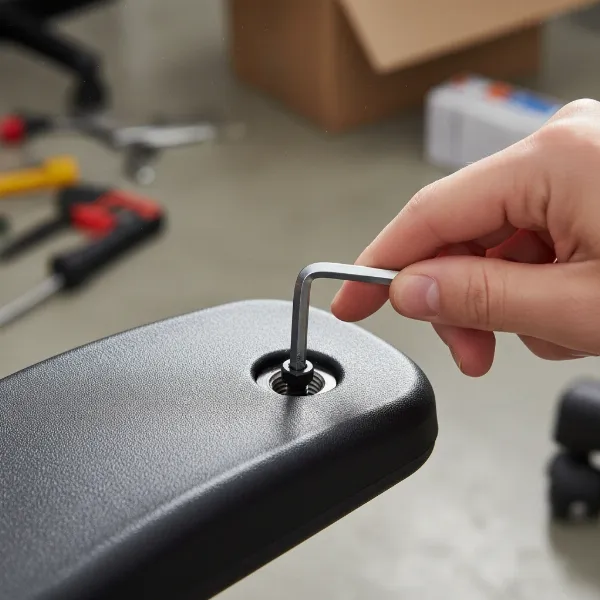 A close-up shot of a hand using an Allen wrench to tighten a screw on the base of a gaming chair armrest, emphasizing the repair process.
Tightening Visible Screws and Bolts
This is often the quickest and most effective fix. Once you’ve located the attachment screws, use the appropriate Allen wrench or screwdriver to tighten them firmly. Do not overtighten, as this can strip the threads or damage the chair components. A snug fit is sufficient. Test the armrest after tightening to see if the wobble has been resolved. If there are multiple screws, tighten them in an alternating pattern, much like you would lug nuts on a car wheel, to ensure even pressure.
Accessing Hidden Fasteners (Removing Covers/Upholstery)
If visible screws don’t solve the problem, or if you can’t find any, you might need to access hidden fasteners. Many gaming chairs have plastic covers or padded upholstery that conceal the main attachment points.
- Plastic Covers: Gently pry off plastic covers using a flathead screwdriver. Look for small indentations or seams where the covers meet the chair. Exercise caution to avoid scratching the plastic or chair frame.
- Upholstery/Fabric: Some chairs might have zippers or Velcro fasteners that allow you to peel back the fabric to reveal the underlying frame and bolts. For others, the seat cushion might need to be detached from the backrest to fully access the armrest assembly. Consult your chair’s manual if you have it, or look for online disassembly guides for your specific chair model.
Once the hidden fasteners are exposed, proceed to tighten them as described above.
Dealing with Stripped Screws or Damaged Threads
Sometimes, the screws themselves might be stripped, or the threads in the chair’s frame (or armrest component) might be damaged.
- Stripped Screw Heads: If your Allen wrench or screwdriver slips, the screw head might be stripped. You might need a screw extractor tool, or as a last resort, carefully use pliers to grip and turn the screw if enough of the head protrudes.
- Stripped Threads: If a screw tightens but then spins freely without holding, the internal threads are likely stripped. You have a few options:
- Larger Screw: Try a slightly larger diameter screw of the same thread type (if possible and safe).
- Thread Repair Kit: For metal threads, a thread repair kit (like a Heli-Coil) can insert new threads. This is a more advanced solution.
- Nut and Bolt: If the attachment point allows, you might be able to replace a screw with a small nut and bolt assembly, securing it from both sides.
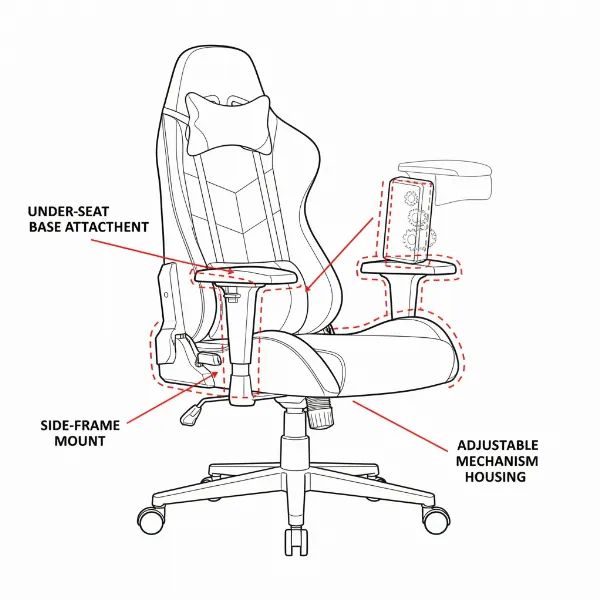 Diagram illustrating various attachment points for gaming chair armrests, showing hidden fasteners and different armrest mechanisms.
Applying Thread Locker for Lasting Stability
For a more permanent fix, especially if you find screws repeatedly loosening, apply a small drop of medium-strength thread locker (like Loctite Blue 242) to the threads of each screw before re-tightening.
> “Thread locker is an unsung hero in chair maintenance. It effectively prevents screws from vibrating loose without making them impossible to remove later, saving you from repetitive repairs.” – Alex Chen, Lead Technician at ErgoPro Chairs
Thread locker cures in the absence of air and prevents fasteners from backing out. Be careful not to use permanent (red) thread locker unless you never intend to remove the screw again, as it can require heat to break its bond. Allow the thread locker to cure for the time specified on its packaging (usually 24 hours) before putting full weight and pressure on the armrests.
Reassembling Your Gaming Chair
Once all fasteners are secure and, if used, the thread locker has had time to set, carefully reattach any covers or upholstery you removed. Ensure all components are properly aligned and secured. Test the armrests again for stability, adjustability, and overall feel. Take your time during reassembly to ensure no parts are left loose or incorrectly installed.
When to Consider Replacing Your Gaming Chair Armrests
While many wobbly armrests can be fixed, there are instances where replacement is the more practical or necessary solution.
- Irreparable Damage: If the core internal mechanism of an adjustable armrest is broken (e.g., snapped metal components, cracked plastic housing that can’t be glued), or if the chair’s frame where the armrest attaches is severely damaged, a repair might not be feasible.
- Stripped Beyond Repair: If multiple screw holes are stripped and cannot be fixed with larger screws or thread repair kits, new armrests might be the only option.
- Wear and Tear: Over many years, the padding on armrests can degrade, or the material can crack and peel. While not a structural issue, replacing them can significantly improve comfort and aesthetics.
- Upgrade Options: Some manufacturers offer upgraded armrests (e.g., metal instead of plastic, different adjustability levels) that can be installed on existing chair models. This can be a worthwhile investment if your chair’s main structure is still sound.
Check with your chair manufacturer for replacement parts. Many popular gaming chair brands sell individual components, including armrests, directly or through authorized resellers.
Preventing Future Wobbly Armrests
Prevention is always better than cure. A few simple habits can keep your armrests stable for years to come.
- Regular Maintenance Checks: Periodically (e.g., every 3-6 months), perform a quick check of all the screws and bolts on your gaming chair, including the armrests. Give them a gentle tighten if they feel loose.
- Avoid Excessive Force: Refrain from using your armrests as leverage to push yourself up or as a step. While they are designed to support your arms, they are not meant to bear your full body weight or withstand sudden, heavy impacts.
- Proper Usage: Ensure you’re using the chair as intended. For instance, if your armrests are designed for 3D or 4D movement, utilize those features gently rather than forcing them.
Troubleshooting Common Armrest Issues
| Issue | Possible Cause(s) | Quick Fixes |
|---|---|---|
| Armrest drifts out of position | Worn internal locking mechanism, dirt/debris | Clean mechanism, apply silicone spray, replace internal parts if available |
| Armrest padding squishy/torn | Material degradation, heavy use | Replace armrest pads (if detachable), cover with armrest sleeves |
| Armrest stuck in one position | Jammed mechanism, dirt, bent internal component | Clean, lubricate, gently try to un-jam; check for bent parts |
| Clicking sound when adjusting | Misaligned parts, loose internal screw | Disassemble and re-align, tighten internal screws |
Top Picks – Components for Repair
While this article focuses on fixing, understanding quality components can help. When considering replacements or upgrades, look for armrests made with durable materials like steel or aluminum for the internal frame, and high-density foam or reinforced PU leather for padding. Brands known for chair parts often offer robust options, even if your chair is from a different manufacturer, as many components are somewhat standardized.
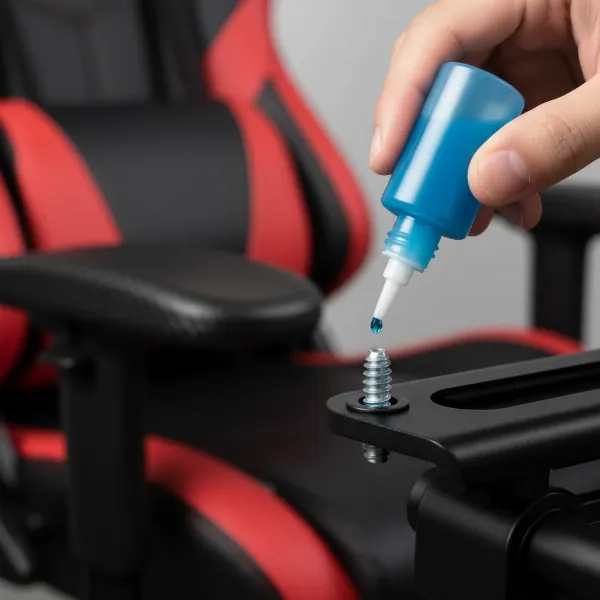 A hand applying blue thread locker to the threads of a screw before inserting it into a gaming chair component.
Conclusion
A wobbly armrest on your gaming chair is more than just an annoyance; it’s a call for attention that, when heeded, can significantly extend the life and comfort of your investment. By understanding the common causes, equipping yourself with the right tools, and following our step-by-step guide, you can confidently tackle most armrest issues. Remember the importance of regular maintenance and mindful usage to prevent future wobbles. Don’t let a loose armrest compromise your posture or your focus—take action and enjoy the stable, supportive experience your gaming chair was designed to provide.
What simple maintenance task have you found most effective in prolonging the life of your gaming gear?
Frequently Asked Questions
Can I use super glue to fix wobbly armrests?
Super glue (cyanoacrylate) is generally not recommended for fixing wobbly armrests, especially on structural components. It’s too brittle and can crack under stress, often making the problem worse or creating a messy, irreversible bond. For loose screws, thread locker is a far more effective and appropriate solution, as it provides a strong hold that can still be undone if needed.
How often should I check my gaming chair armrests for wobbles?
It’s advisable to perform a quick check of your Gaming Chair’s armrests and other major components every three to six months, especially if you use your chair frequently. This proactive approach allows you to identify and tighten any loosening fasteners before they become a significant wobble, preventing potential damage and ensuring consistent comfort and stability.
Are all gaming chair armrests fixable?
While many wobbly armrests are fixable by tightening screws or applying thread locker, not all issues can be repaired. If the internal mechanism of an adjustable armrest is broken, the plastic housing is severely cracked, or the mounting points on the chair frame are irreversibly damaged, replacement might be the only viable option. Always assess the extent of the damage before attempting a repair.