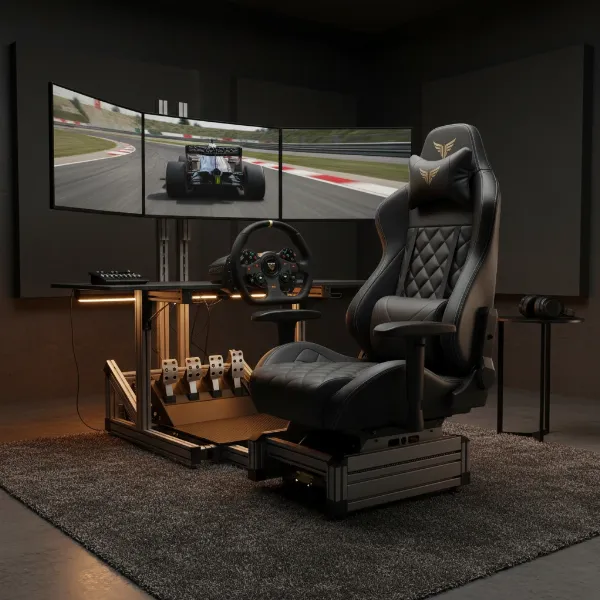
Spending countless hours immersed in virtual worlds or working diligently at your desk often comes at a cost to your physical well-being. Poor sitting habits can lead to an array of discomforts, from nagging back pain to stiff necks and shoulders. Fortunately, gaming chairs are specifically engineered to combat these issues, providing robust support for prolonged sessions. However, owning an ergonomic gaming chair is only half the battle; knowing how to adjust and utilize it correctly is paramount to unlocking its full postural benefits. This comprehensive guide will walk you through the essential steps to achieve optimal posture in your gaming chair, transforming your comfort and enhancing your overall experience.
Understanding Gaming Chair Ergonomics and Your Posture
Ergonomics in gaming chairs refers to the design principles aimed at maximizing user comfort, efficiency, and health by adapting the chair to the human body. Unlike standard office chairs, gaming chairs often feature high backrests, adjustable lumbar and neck pillows, and versatile recline functions, all intended to support the natural curves of your spine. The evolution of gaming chairs, from basic racing-style seats, has focused increasingly on these ergonomic elements to address the unique demands of extended seated activities. Achieving a neutral posture – where your spine maintains its natural S-curve – is the core goal, as it distributes weight evenly, reduces pressure on joints and muscles, and prevents the development of chronic pain. Embracing ergonomic seating isn’t just about comfort; it’s a proactive step towards long-term spinal health and preventing common issues like lower back pain.
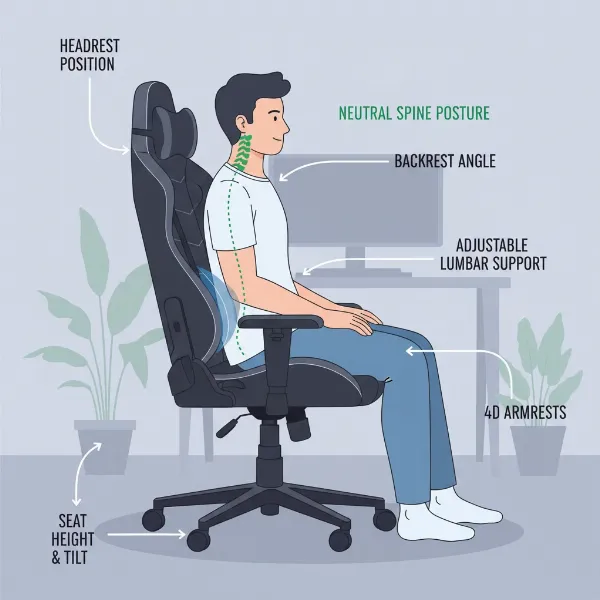 Illustration of a person sitting in a gaming chair with proper ergonomic adjustments highlighted for optimal posture.
The Foundations of Correct Gaming Chair Posture
Establishing the correct sitting posture in your gaming chair involves aligning several key body points to ensure balanced support and reduce strain. It begins with your lower half and extends up through your spine to your head.
- Feet Placement: Your feet should be flat on the floor. If your feet don’t comfortably reach, use a footrest to ensure your knees are at the correct angle. Avoid crossing your legs or tucking them under the chair, as this can impede circulation.
- Knees: Aim for a 90-degree angle at your knees. Your thighs should be parallel to the floor, with your knees positioned slightly lower than your hips. This open hip angle supports a healthy spinal alignment.
- Hips: Sit as far back into the seat as possible, ensuring your hips are deeply tucked against the backrest. This prevents slouching and allows your lumbar support to be effective.
- Lower Back: Engage your chair’s lumbar support. Whether it’s an adjustable pillow or a built-in mechanism, position it to fill the natural inward curve of your lower back. This support is crucial for maintaining the lumbar lordosis and preventing slouching that can lead to back pain.
- Upper Back and Shoulders: Your upper back should rest gently against the backrest. Keep your shoulders relaxed and pulled slightly back, avoiding any hunching forward.
- Neck and Head: Your head should be balanced directly over your spine, not jutting forward. If your chair has a neck pillow, adjust it to support the natural curve of your neck, keeping your gaze level with your monitor.
- Arms and Elbows: Your armrests should be adjusted so your elbows form an approximately 90-degree angle, keeping your forearms parallel to the floor. This setup reduces strain on your shoulders, neck, and wrists, especially when typing or using a mouse.
Adjusting Your Gaming Chair for Optimal Posture
Optimizing your gaming chair for perfect posture requires a systematic approach to its adjustable features. Each component plays a vital role in creating an ergonomic seating environment tailored to your body.
- Chair Height: Begin by adjusting your seat height. The ideal height allows your feet to rest flat on the floor, with your knees forming a 90-degree angle. For shorter individuals, a footrest is essential to achieve this position. Taller users should ensure their thighs remain parallel to the floor without excessive pressure on the underside of their legs.
- Lumbar Support: Position your lumbar pillow or built-in support to fit precisely into the natural inward curve of your lower back. If the support is too low, it can cause your hips to curl forward, while too high can push your upper back unnaturally. Experiment with its height and depth until it comfortably supports your spine’s natural curve, preventing slouching.
- Backrest Recline: The backrest angle is crucial for dynamic sitting. For active work or intense gaming, a slight recline of 100-110 degrees is often recommended. This angle reduces pressure on your spinal discs compared to a rigid 90-degree upright position, without compromising support. Utilize the recline function throughout the day to shift positions, promoting blood flow and reducing static load on your back muscles. Avoid overly reclined positions for tasks requiring focus, as this can lead to slouching or forward head tilt.
- Armrests: Adjust your armrests so your arms are comfortably supported, and your elbows form a 90-degree angle when your hands are on your keyboard and mouse. They should be at the same height as your desk surface. This prevents your shoulders from shrugging up or drooping down, alleviating tension in your neck and upper back, and reducing wrist strain.
- Headrest/Neck Pillow: Position the neck pillow to gently support the natural curve of your neck, typically at the base of your skull. It should encourage an upright head position and prevent your head from tilting forward or backward, reducing strain on your cervical spine.
- Seat Depth: If your chair has adjustable seat depth, ensure there’s a gap of about two to four fingers between the edge of the seat and the back of your knees. This prevents pressure on the blood vessels and nerves in your legs, promoting healthy circulation.
Benefits of Maintaining Correct Gaming Chair Posture
Adopting the correct posture in your gaming chair offers a multitude of benefits that extend far beyond simple comfort, impacting both your physical health and overall performance.
Maintaining proper spinal alignment through correct posture significantly reduces back pain and the risk of developing chronic spinal issues. By supporting the natural curves of your spine, gaming chairs alleviate pressure on discs and ligaments, preventing the strain that often accompanies prolonged poor seating. This, in turn, minimizes neck and shoulder strain, as a correctly positioned headrest and supportive backrest prevent the common forward head posture and rounded shoulders.
Beyond pain relief, proper posture in a gaming chair enhances blood circulation throughout your body. When your body is aligned and not compressed, blood flows more freely, reducing numbness, tingling, and the risk of conditions like deep vein thrombosis (DVT). This improved circulation contributes to reduced fatigue, allowing you to remain comfortable and energized for longer periods, whether you’re gaming, working, or studying.
Furthermore, ergonomic posture can lead to increased focus, concentration, and gaming performance. When you’re not distracted by discomfort or pain, your mind can fully engage with the task at hand. Gamers often report improved reaction times and sustained attention during intense sessions, directly attributable to a comfortable and supportive seating position. The design of gaming chairs also encourages active sitting, allowing for subtle movements and adjustments that keep muscles engaged and prevent stiffness, further contributing to your well-being.
“A well-adjusted gaming chair isn’t just about luxury; it’s a fundamental tool for preserving spinal health and boosting performance during long hours. It encourages your body’s natural alignment, which is key to preventing long-term discomfort.” – Dr. Elena Petrova, Ergonomics Specialist
Common Posture Mistakes and How to Avoid Them
Even with an ergonomic gaming chair, it’s easy to fall into bad habits. Recognizing and correcting these common posture mistakes is vital for maximizing your chair’s benefits.
One of the most prevalent errors is slouching and hunching forward. This position rounds your spine, puts immense pressure on your lower back, and strains your neck. To counteract this, ensure your lumbar support is correctly positioned, and consciously push your hips back into the seat. Regularly check if your shoulders are relaxed and your upper back is against the chair’s backrest.
Another common issue is having your feet dangling or crossed. This disrupts blood flow, can lead to numbness, and prevents a stable base for your posture. Always ensure your feet are flat on the floor or a footrest, creating that crucial 90-degree knee angle.
Incorrect lumbar support positioning can render this essential feature useless. If the lumbar pillow is too low, it can cause your pelvis to tilt backward, flattening your natural spinal curve. If it’s too high, it might push your upper back forward. Take the time to adjust it precisely to the inward curve of your lower back for effective support.
Armrests that are too high or too low can lead to shrugged shoulders or unsupported arms, causing tension in the neck, shoulders, and wrists. Adjust them to match your desk height, allowing your elbows to rest at a comfortable 90-degree angle, taking the load off your upper body.
Finally, sitting rigidly for too long is a mistake, even with perfect posture. The human body is designed for movement. Avoid static positions by utilizing your chair’s recline function to shift your weight, or simply stand up and stretch periodically. Dynamic sitting, where you subtly change your position, helps maintain muscle activity and blood flow.
Beyond the Chair: Integrated Ergonomic Setup Tips
While your gaming chair is a cornerstone of good posture, a truly ergonomic setup integrates all elements of your workspace. Optimizing your desk and peripherals is essential for holistic health and comfort.
Start with your desk height and monitor placement. Your desk should allow your keyboard and mouse to be at a height where your elbows remain at a 90-degree angle with relaxed shoulders. Your monitor should be positioned directly in front of you, with the top edge of the screen at or slightly below eye level. This prevents neck strain from looking up or down excessively. If you use multiple monitors, ensure your primary screen is centered.
Consider keyboard and mouse ergonomics. Use an ergonomic keyboard and mouse that fit your hand comfortably, reducing strain on your wrists and forearms. Keep these peripherals close to your body to avoid overreaching, which can stress your shoulders. A wrist rest can be beneficial but should support the palm of your hand, not the wrist itself.
Perhaps the most important tip beyond your chair is to take regular breaks and perform stretching exercises. Even with the most perfect ergonomic setup, prolonged static sitting is detrimental to health. Aim to stand up, walk around, and stretch every 30-60 minutes. Simple stretches for your neck, shoulders, back, and wrists can significantly reduce stiffness and promote blood flow.
Embrace dynamic sitting by utilizing your chair’s recline and tilt functions. Don’t feel obligated to stay in one “perfect” position. Shifting your posture subtly, rocking gently, or reclining slightly can engage different muscle groups, maintain circulation, and prevent the discomfort associated with static load. Your body thrives on movement, even small ones.
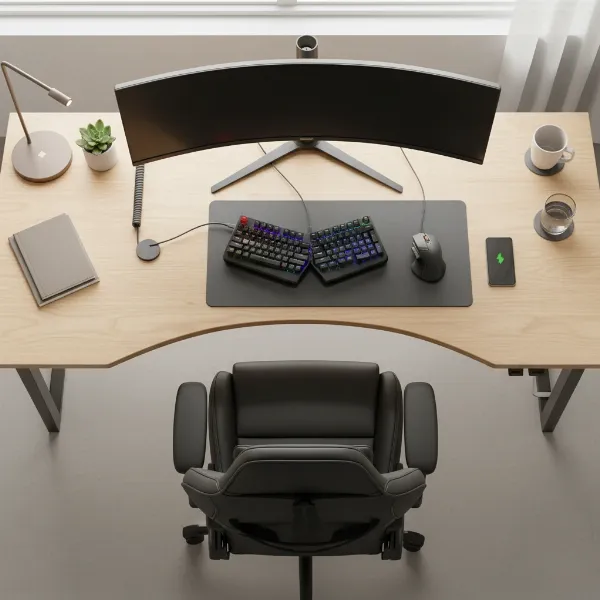 An overhead view of an ergonomic gaming desk setup, showing a gaming chair, monitor at eye level, ergonomic keyboard, and mouse positioned correctly.
Conclusion
Mastering how to sit correctly in a gaming chair is a game-changer for anyone spending significant time at their desk. By understanding and implementing proper ergonomic adjustments, you can transform your experience from one of potential discomfort to sustained productivity and enjoyment. From setting your chair’s height and lumbar support to optimizing armrests and embracing dynamic sitting, each adjustment contributes to a healthier spine, reduced pain, and enhanced focus.
Investing a little time in configuring your gaming chair and integrating it into an ergonomic workspace is an investment in your long-term health and performance. Don’t let poor posture hold you back. Take control of your comfort and well-being. What changes will you make to optimize your setup today for a healthier, more enjoyable experience?
Frequently Asked Questions
How often should I take breaks while gaming?
|
Our Picks for the Best Gaming Chair in 2026
As an Amazon Associate I earn from qualifying purchases.
|
||
| Num | Product | Action |
|---|---|---|
| 1 | BestOffice High-Back Gaming Chair PC Office Chair Computer Racing Chair PU Desk Task Chair Ergonomic Executive Swivel Rolling Chair with Lumbar Support for Back Pain Women, Men,White |

|
| 2 | BestOffice Gaming Chair Office Chair Ergonomic Desk Chair Racing Style Gaming Chair with Lumbar Support, Swivel Rolling Base, and Comfortable Padded Seat for Women and Men |
|
| 3 | Breathable Fabric Gaming Chair with Footrest, Height Adjustable Game Chair, Video Gaming Chair for Gaming Room, Living Room and Office - Blue/Light Grey |
|
| 4 | Razer Iskur V2 X Ergonomic Gaming Chair: Built-in Lumbar Support - Widened Seat Base - High Density Foam Cushions - Adjustable 152 Degree Recline - 2D Armrests - Plush Fabric Finish - Black |
|
| 5 | Sweetcrispy Computer Gaming Desk Chair - Ergonomic PU Leather with Comfy Lumbar Support, Height Adjustable Rolling Desk with Flip-up Armrests, for Home and Office |
|
| 6 | TRALT Office Chair Ergonomic Desk Chair, 330 LBS Home Mesh Office Desk Chairs with Wheels, Comfortable Gaming Chair, High Back Office Chair for Long Hours (White) |
|
| 7 | Gaming Chair, 400 lbs Adult Chair, High Back Computer Chair with Footrest and Linked Armrests, Office Video Game Chair with Lumbar Support (Grey) |
|
| 8 | GTPLAYER Gaming Chair,Office Chair with Pocket Spring Lumbar Support, Ergonomic Comfortable Wide Office Desk Computer Chair with Outward Fixed Soft Armrests and Footrest (PU Leather, Black) |
|
| 9 | Ergonomic Office Chair with Footrest - Adjustable Lumbar Support & Headrest, 90-160° Reclining Mesh Back Computer Chair - Home Office/Gaming, 350lbs Capacity (SGS Certified) |
|
| 10 | Gaming Chair with Linkage Armrest & Footrest, High Back Video Gaming Chair, Black/White |
|
It is highly recommended to take a short break, around 5-10 minutes, every 30-60 minutes of sitting. Use this time to stand up, stretch, walk around, and let your eyes rest from the screen. This promotes blood circulation and reduces physical stiffness.
Can a gaming chair fix existing back pain?
While an ergonomic gaming chair can significantly alleviate existing back pain and prevent its worsening by promoting correct posture, it’s not a magical cure. Consistent use with proper adjustments, combined with regular movement and, if needed, professional medical advice, offers the best results for managing and reducing back pain.
What is the ideal recline angle for gaming?
For active gaming or work, an ideal recline angle is typically between 100 to 110 degrees. This slight recline reduces pressure on your spinal discs compared to a fully upright 90-degree position, while still providing ample support and maintaining an engaged posture for focused tasks.
Should my feet always be flat on the floor?
Yes, for optimal ergonomic posture, your feet should always be resting flat on the floor or a stable footrest. This ensures your knees are at a 90-degree angle (or slightly lower than your hips) and helps to stabilize your lower body, preventing slouching and promoting healthy circulation in your legs.
Is a gaming chair better than an office chair for posture?
Many high-quality Gaming Chairs offer excellent ergonomic features, including high backrests, adjustable lumbar and neck support, and multi-directional armrests, making them very beneficial for posture. However, high-end ergonomic office chairs are also excellent. The “better” choice often depends on individual body type, specific needs, and how well the chair can be adjusted to achieve proper posture for the user.